Labeeb M. Say hi
← All projects
Case study 01Zaper · Workforce SaaS · Live

AI Voice Insight Generator

Site workers speak an update in their own language. The AI turns it into structured reports, and the worker checks them before anything is sent.

Role
Senior Product Designer
Team
AI/ML engineers, developers
Platform
iOS · Android
Timeline
Sept 2024 · 8 weeks
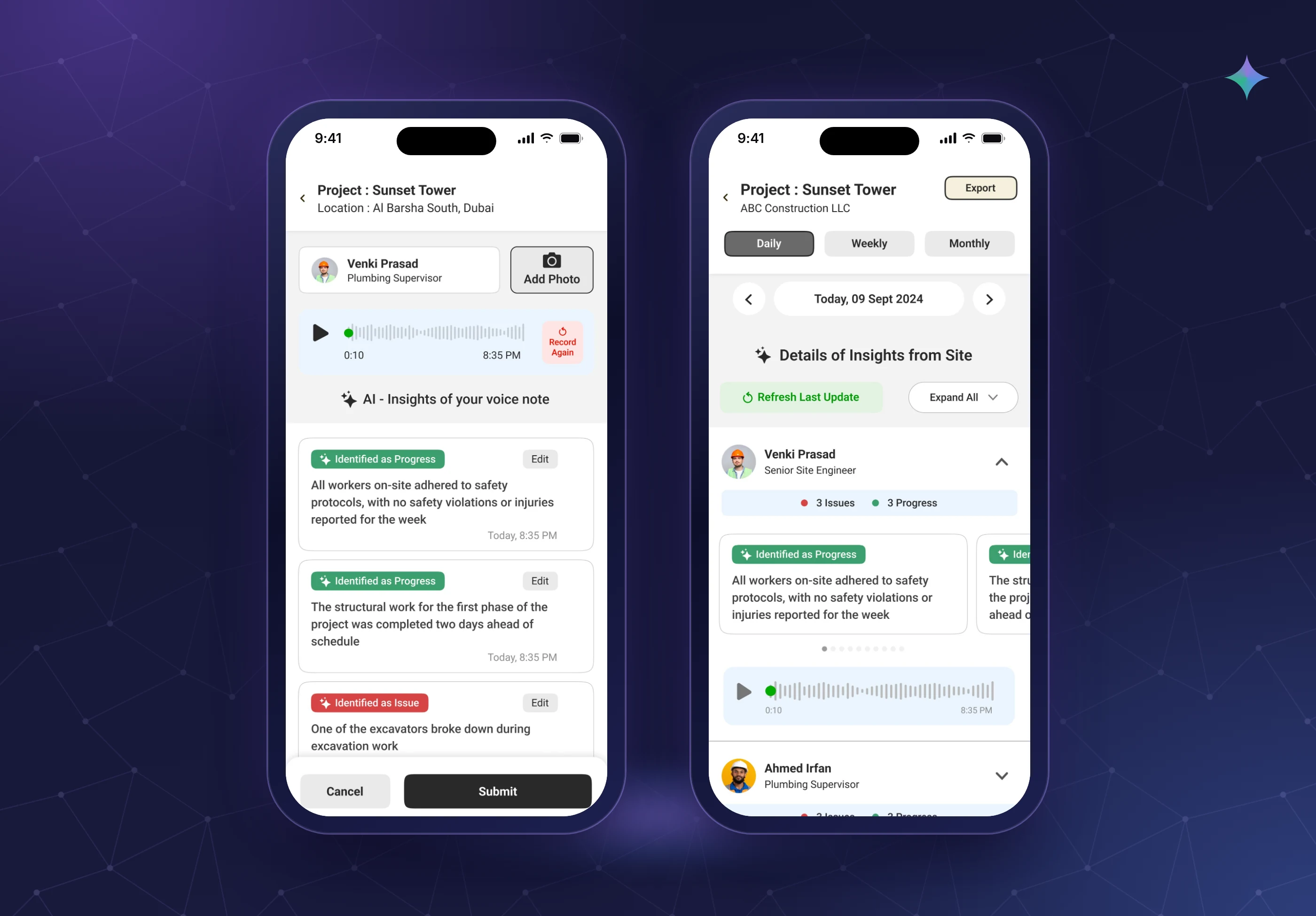
Two phones: the manager's insight dashboard and the worker's AI confirm screen.
  1. Problem

    Daily reporting forms took about 10 minutes. Field engineers didn't have them, so updates went to WhatsApp or nowhere.

  2. Where AI sits

    Speech-to-text, translation, splitting one note into updates, and labelling each as Issue or Progress.

  3. Key decision

    The AI suggests and the worker confirms. The AI may only mark something urgent if the worker said it.

  4. Outcome

    82% field adoption by week 3, up from 12% with forms. Reporting about 3× faster.

    Source: User survey
How I used AIInput → AI → human check → output

What happens after someone speaks.

Several steps, not one model. The AI does the heavy lifting in the middle. The worker has the last word before anything reaches a manager.

  1. 01 · Person Record

    The worker picks a language and speaks. Usually Malayalam, Hindi or Tamil.

  2. 02 · AI Speech to text

    The voice note becomes text in the spoken language.

    ⚠ Can mishear on noisy sites
  3. 03 · AI Translate

    The text is translated to English for managers.

    ⚠ Can lose tone, like how serious something is
  4. 04 · AI Split

    One note often covers two or three things, so it is split into separate updates.

    ⚠ Can merge two updates into one
  5. 05 · AI Label & link

    Each update is labelled Issue or Progress and linked to the right project or task.

    ⚠ Can sound more certain than the worker was
  6. 06 · Human check Worker confirms

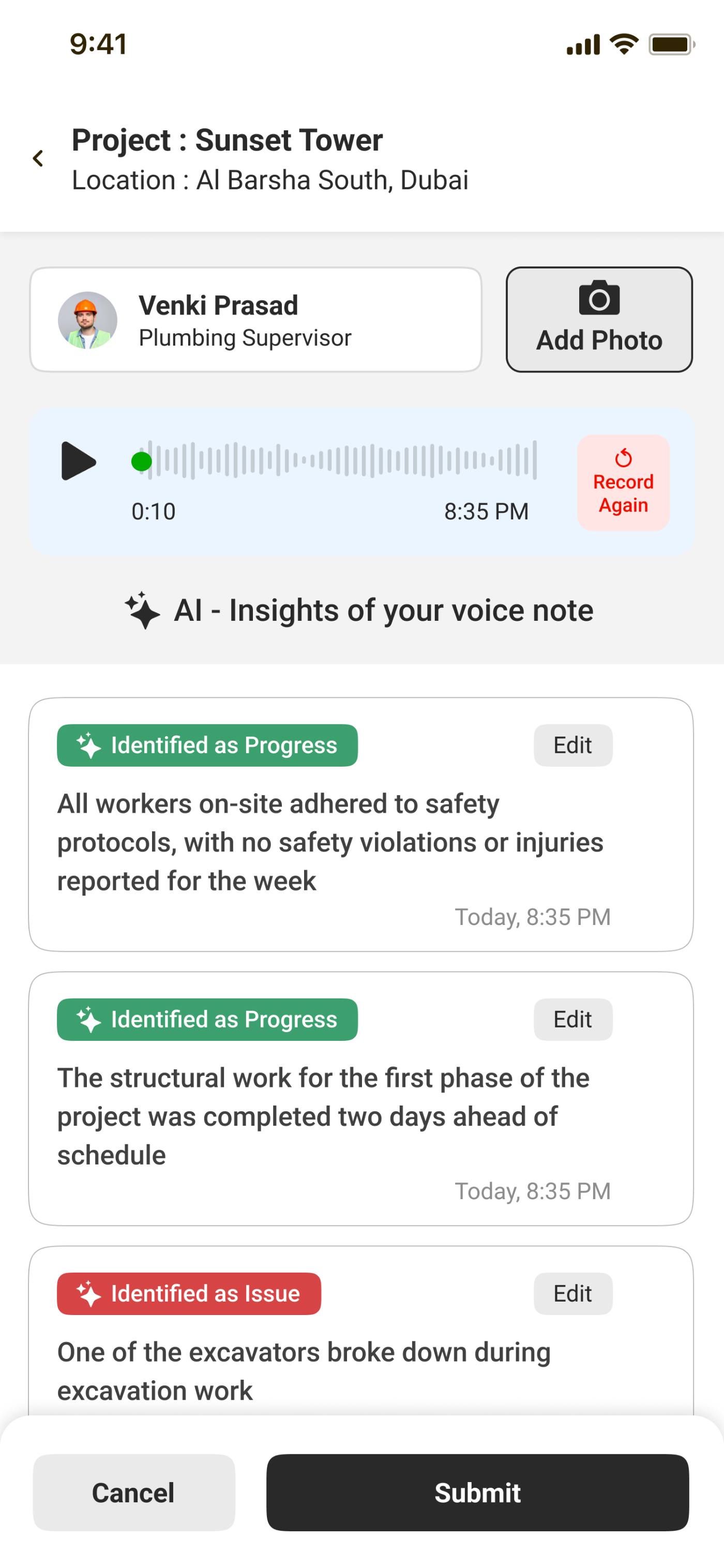
    A confirm screen shows what the AI understood. The worker fixes anything, then sends.

  7. 07 · Output Report

    Managers get structured updates, with the original voice note attached to every one.

AI step Human in the loop Where it can go wrong

What I changed and why3 decision stories

Real moments that changed the design.

“Dripping a little” became “Major leak, urgent”.

Problem
The AI filled in how serious an issue was, even when the worker never said.
What I observed
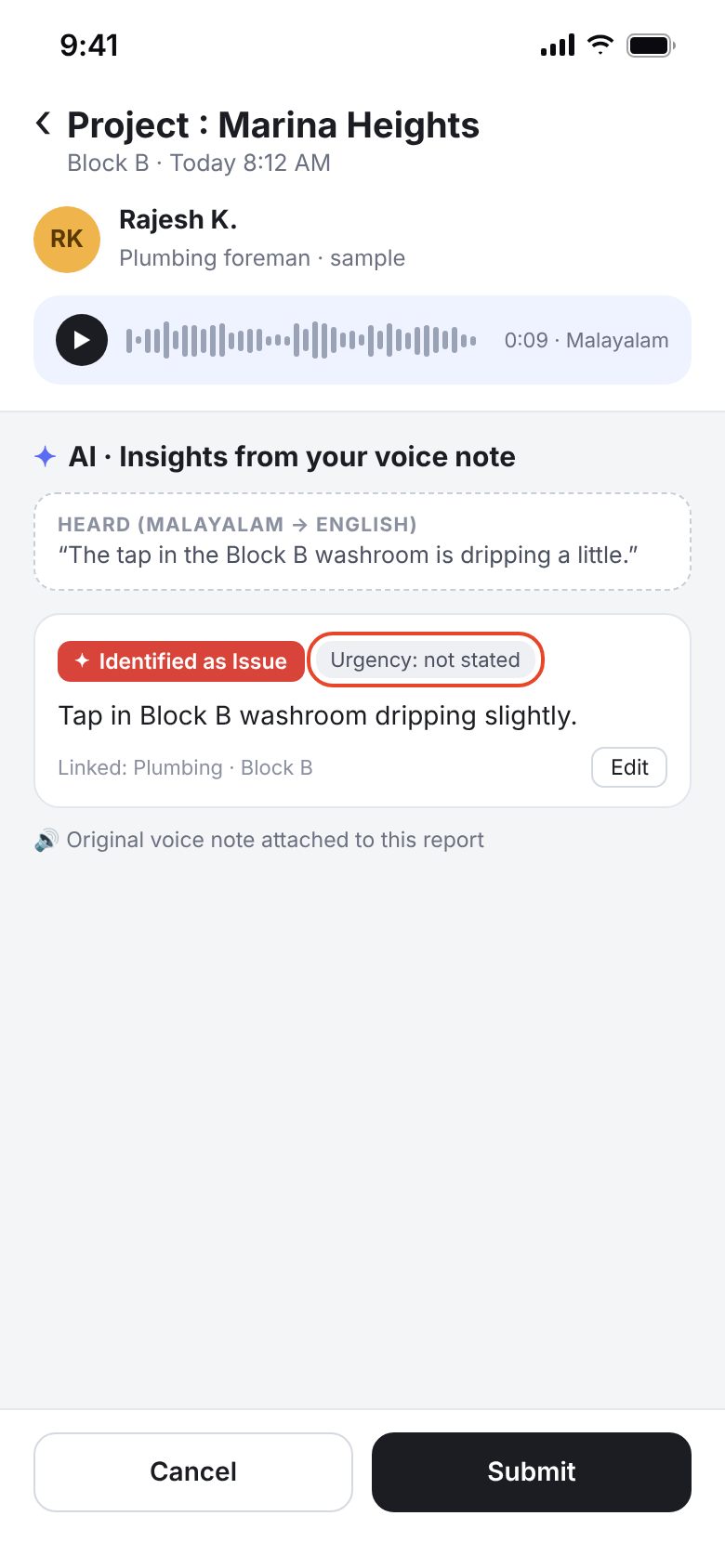
In testing, a worker said in Malayalam that a tap was “dripping a little”. The AI wrote “Major leak, urgent”.
What it revealed
This is the “sounds certain” problem. Supervisors would have sent someone out for nothing, and they'd stop trusting urgent flags.
My decision
The confirm screen caught it: the worker saw “Urgent” and changed it before sending. So the AI may only set urgency when the worker actually says it is urgent.
What changed
Urgency is “not stated” unless spoken. The original voice note stays attached so supervisors can listen for themselves.
Outcome
Urgent flags mean what workers meant, and the confirm step proved its value in a real case.
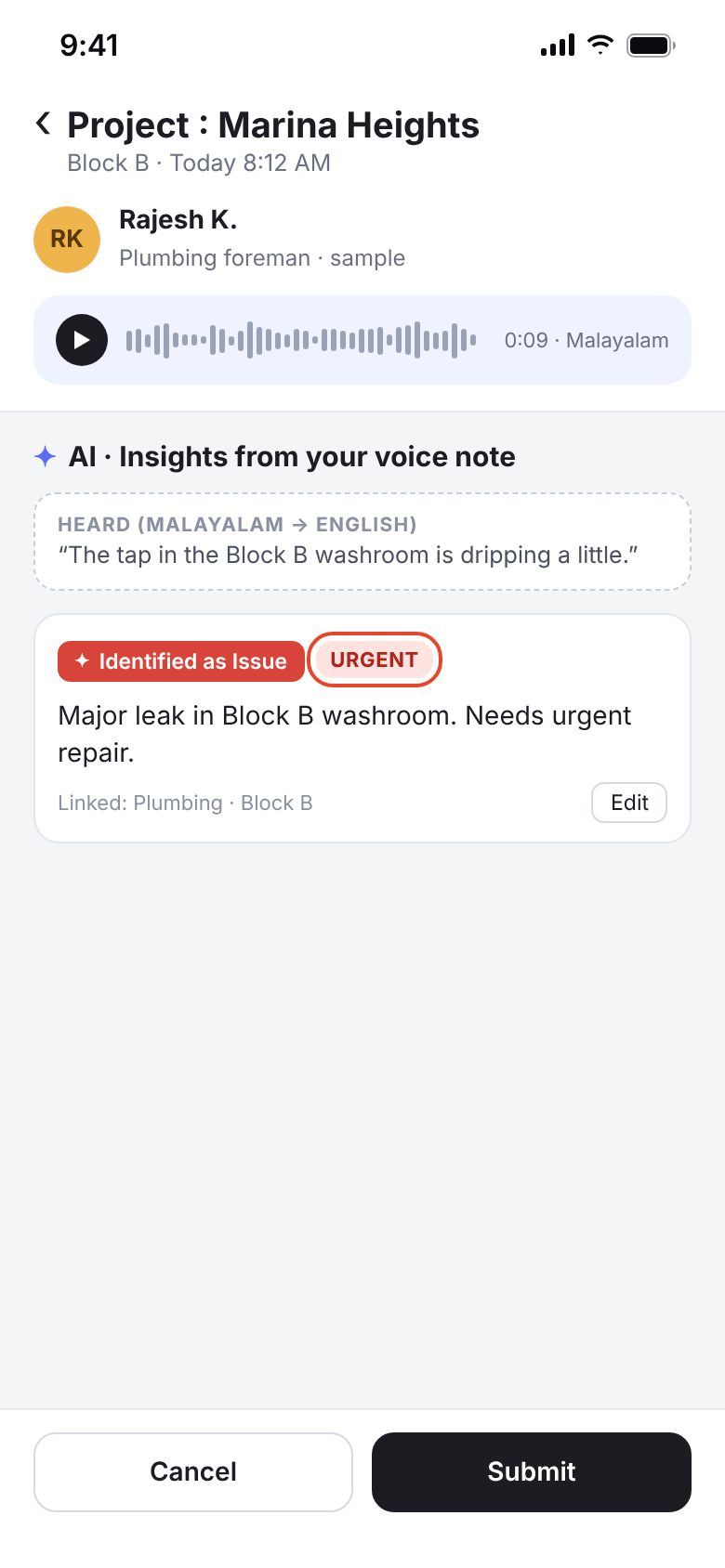
BeforeThe AI adds “Urgent” that the worker never said.
Before: The AI adds “Urgent” that the worker never said.
AfterUrgency “not stated”, voice note attached.
After: Urgency “not stated”, voice note attached.

Two updates in one sentence, one got lost.

Problem
Workers rarely report one thing at a time. A single note often mixes good news and a problem.
What I observed
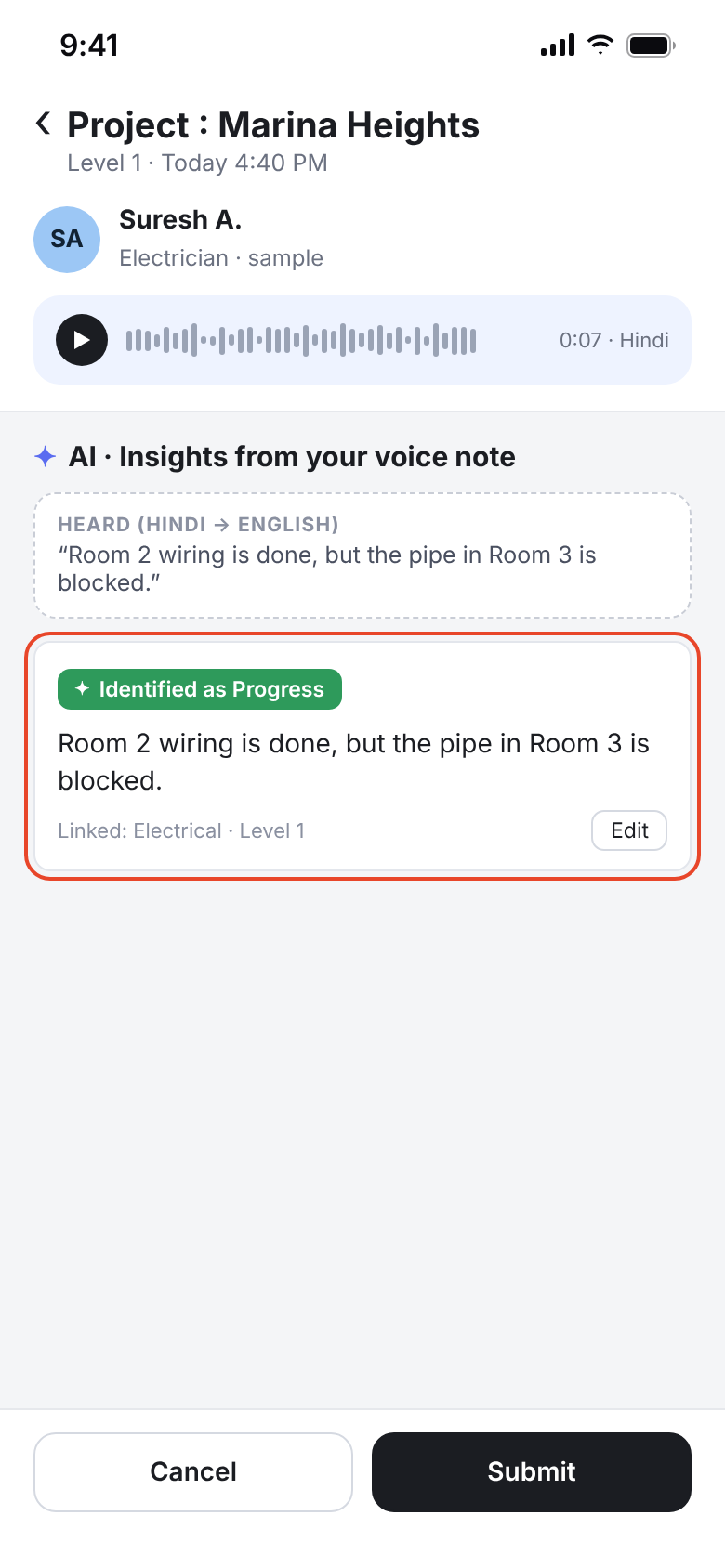
“Room 2 wiring is done, but the pipe in Room 3 is blocked” came out as a single Progress item.
What it revealed
When the AI merges updates, the issue hides inside a green Progress card. Managers scanning for red would never see the blocked pipe.
My decision
Fix it in two places: the AI team improved the split step, and I gave workers control on the confirm screen.
What changed
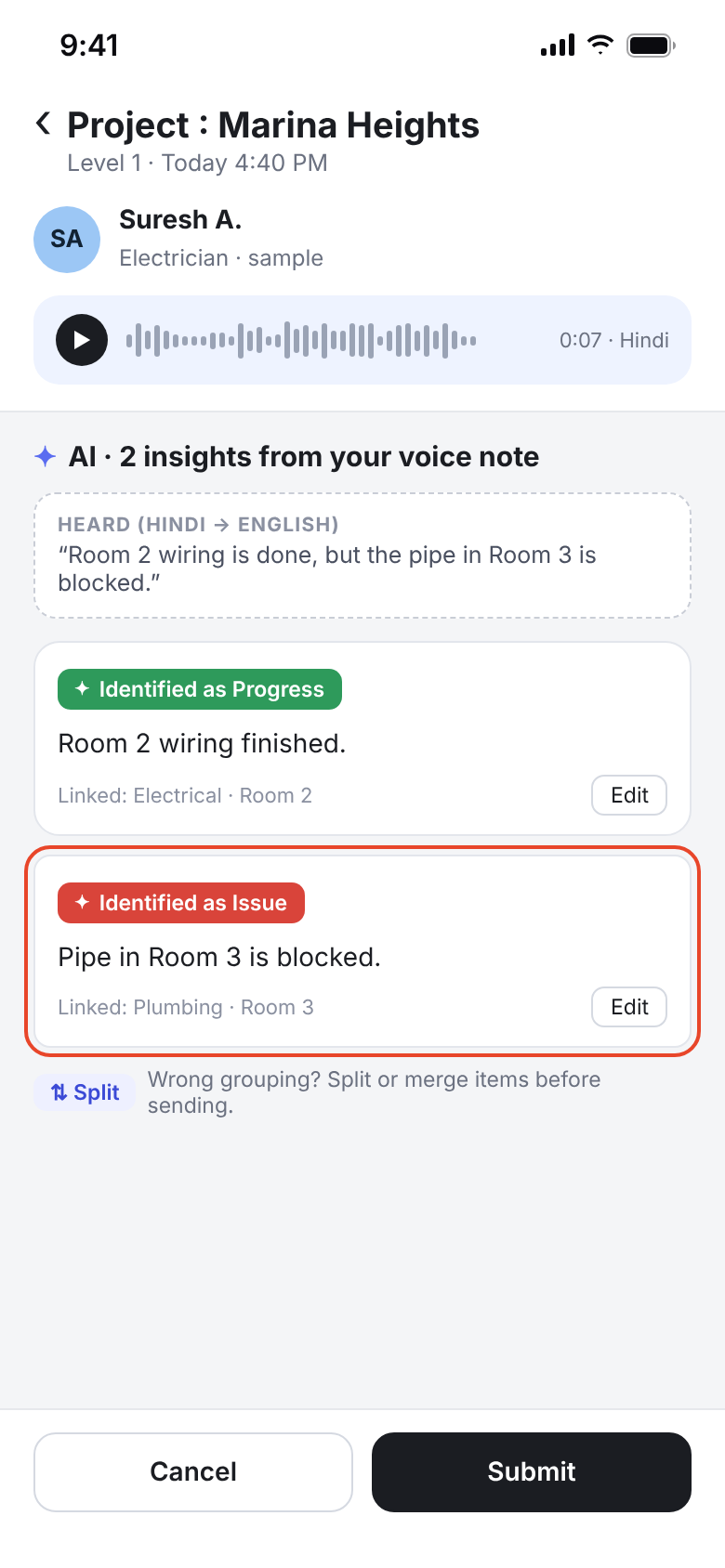
Workers can split or merge items before sending, so a wrong grouping is a one-tap fix, not a lost issue.
Outcome
Issues stay visible as their own red items, even when the AI groups them badly.
BeforeThe issue is buried inside a Progress item.
Before: The issue is buried inside a Progress item.
AfterSplit into Progress and Issue. Workers can split or merge.
After: Split into Progress and Issue. Workers can split or merge.

Managers didn't trust a translated summary.

Problem
Managers read English summaries of notes spoken in Malayalam, Hindi or Tamil.
What I observed
Managers told us they couldn't fully trust a translated summary to say what the worker meant.
What it revealed
Translation is a second layer of interpretation on top of transcription. A summary with no source asks managers to trust the AI twice.
My decision
Never show the AI's version without the source.
What changed
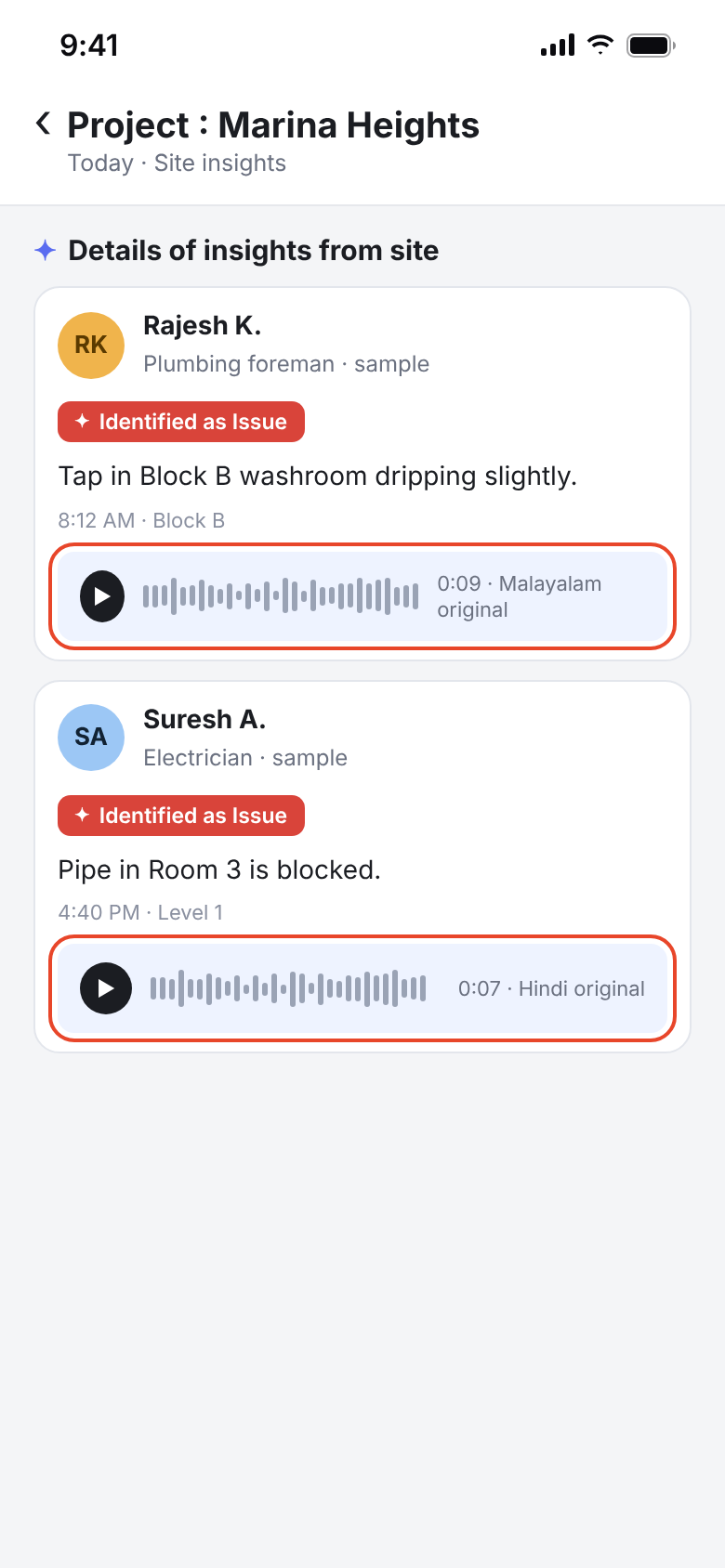
The original voice note is attached to every report, so a manager can check it in seconds.
Outcome
The summary saves time, and the voice note settles doubts without a phone call.
BeforeA translated summary only.
Before: A translated summary only.
AfterThe original voice note travels with every report.
After: The original voice note travels with every report.

Before/after screens are recreated for this case study from the shipped app. Names are samples.

The final experienceShipped screens

What shipped, and why it works that way.

Worker · confirm screen
Worker · confirm screenThe AI splits the note into labelled insights. Each has Edit, the worker can record again, and nothing is sent until they submit.
Manager · project insights
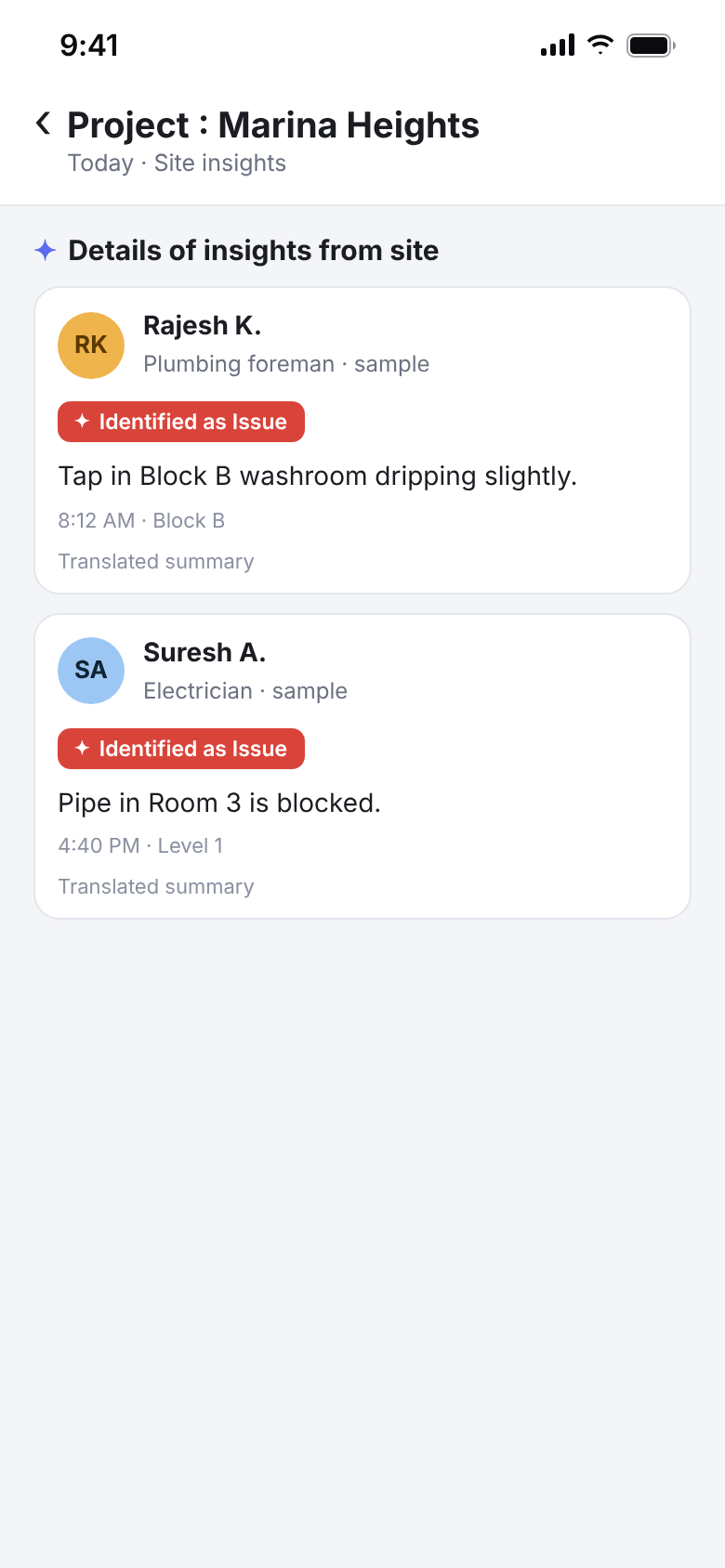
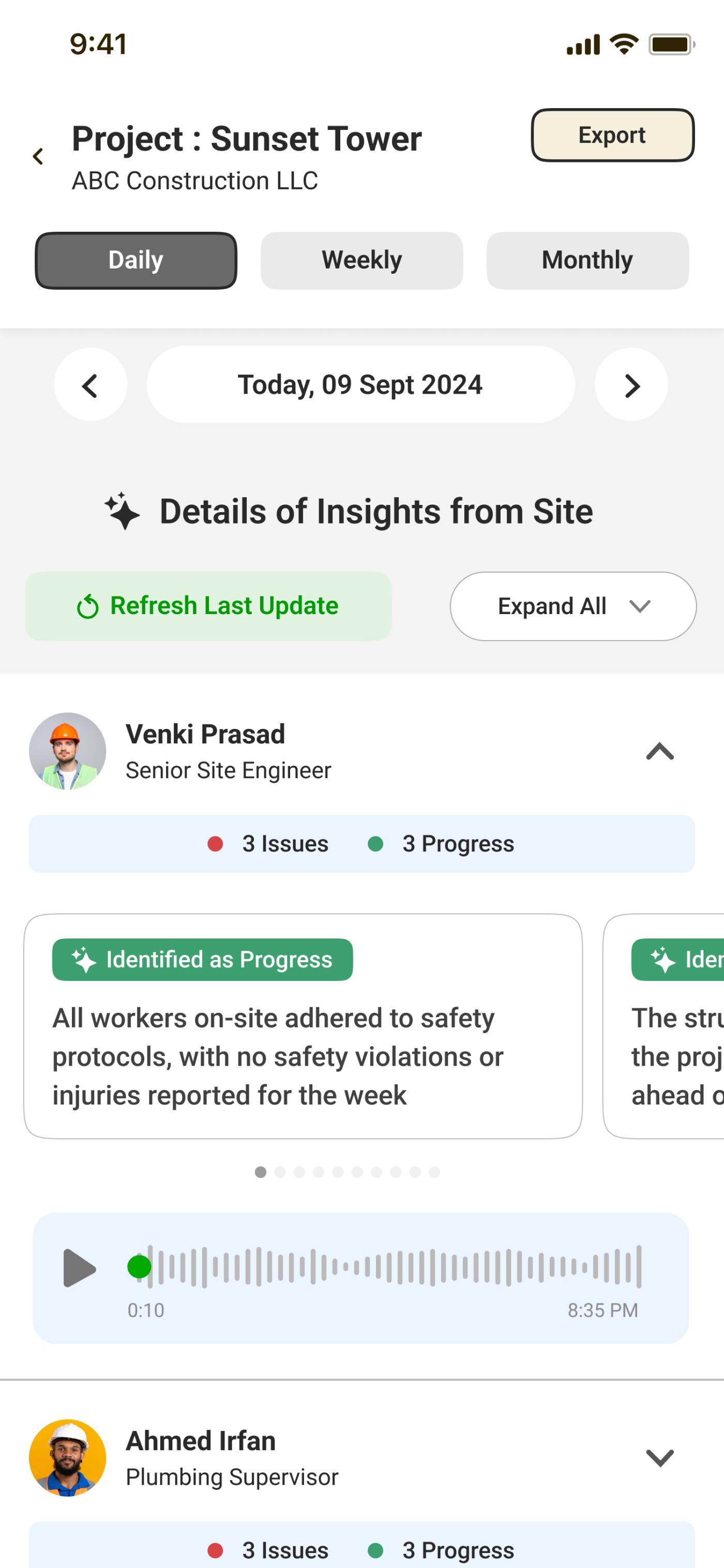
Manager · project insightsGrouped by person, not time, with issue and progress counts and the voice note inline.
Go deeperContext, discovery, decisions, barriers

The full story, if you have three more minutes.

01Context: what I was asked to build

Zaper is a workforce platform for construction and facility management. The brief was a faster way for field teams to report daily progress and issues to management. My role: end-to-end product design for the field app and the manager view, working with AI/ML engineers and developers.

AI made sense because the input was already speech. Workers narrated problems to supervisors all day. What was missing was a way to capture that without a form.

02What I discovered, beyond the brief
  • It was a tool problem, not a motivation problem. “The form takes 10 minutes. I don't have 10 minutes. I have 10 seconds between tasks.” (site engineer).
  • Language was the adoption blocker. 65% of crew members said they weren't comfortable reporting in English (survey).
  • Managers needed a briefing, not a feed. They checked updates before morning meetings and closed the app when faced with 80 entries.
  • Photos made updates credible. Reports with a photo were acted on faster.

Research: 12 interviews across 4 active sites, with behaviour observed on site.

03Other decisions that shaped the product
  • The mic is the whole entry screen. The first version put a voice field inside a form. Load at the entry point was the main reason people dropped reports, so the mic became one big button.
  • Pick the language first. Auto-detect failed on bilingual workers and multilingual phones, and wrong transcripts cost trust. A 2-second picker before recording fixed it.
  • Annotate photos. Managers couldn't always see what in a photo was the problem, so workers can circle or arrow it.
  • Top 10 Insights. Rules set the order: issues before progress, urgent first (only when said), then recent, then high-priority projects. The AI groups similar reports so one problem doesn't fill five slots.
04Barriers: noise, accents and mixed languages

Construction sites are loud, and workers mix languages in one sentence. Transcription errors were inevitable, so the design assumes them. The language is chosen up front, the worker can re-record, and the confirm screen is built to be scanned in seconds. The original voice note is the final fallback for anyone reading the report.

ResultsFrom a user survey after launch. The other outcomes are observations.

What changed after launch.

  • 82%Field adoption by week 3, up from 12% with forms
  • 3×Faster reporting, about 9 min to under 3 min
  • 40%Fewer management escalations from missed updates
  • 60%Higher trust scores after adding the confirm step
  • 91%Of managers used Top 10 daily in week 1
  • 6+Languages at launch, including Malayalam, Hindi, Tamil, Arabic
What I learnedAnd what I'd change
Design for the AI being wrong, not just right.

Every story here was caught by the confirm screen. It earned its place as the core of the product, not a formality.

Show the source next to the AI's version.

A summary saves time. The original voice note is what makes people believe it.

Next timeWhat I'd change: make the AI ask instead of guess.

Most of our errors came from the AI filling gaps with confident guesses. When a note is unclear, like whether something is urgent or which site the worker means, the AI should ask one quick question at the moment of recording. A short question is cheaper than a wrong report later.

ContactSay hi

Building something with AI? Let's talk.

I'm open to product design roles in any sector where AI needs to feel simple and trustworthy.

Labeeb Manamkandath
that's me, in Dubai
© 2026 Labeeb Manamkandath